
KIOSK Display Rental
-
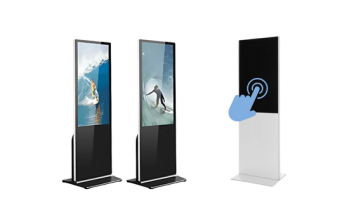
43 Inch Horizontal Touch Screen KIOSK Rental
43″ Interactive Touch Screen Rental – Horizontal Touch Screen Display
Rent 43″ Interactive Touch Screen Display for upcoming events like conferences, trade shows, activations, and exhibitions, this horizontal touch screen brings interactive engagement to the next level. With its stunning full-HD resolution and customizable features, it’s the ideal solution for showcasing content, wayfinding, branding, and more.
-
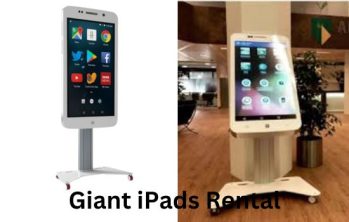
Giant iPad Rental
At LED Screen Rental, we offer Giant iPad Rentals that provide a sleek, interactive experience for your trade shows, corporate events, product launches, and marketing activations. These oversized iPads function just like the real thing—only bigger, bolder, and more engaging!
Our event rental services are available in major cities across the USA, catering to Fortune 500 companies, small businesses, and event planners looking for high-impact display solutions.
-
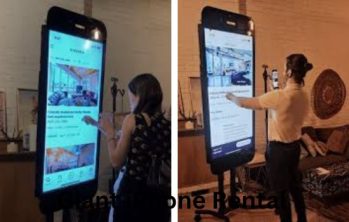
Giant iPhone Rental
Giant iPhone Rental – A Bigger, Bolder, and More Interactive Experience!
Looking for a show-stopping display to engage your audience at your next event? At LED Screen Rental, we provide Giant iPhone Rentals to create an interactive and visually striking experience for trade shows, corporate events, product launches, marketing activations, and more.
Our event rental services are available in major cities across the USA, catering to Fortune 500 companies, small businesses, and event planners who trust us to deliver high-impact display solutions.
-
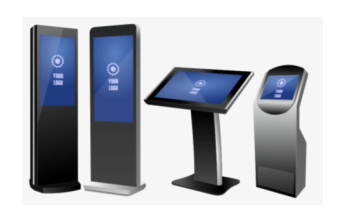
Information Kiosk Rental
Feature Description Display Size 32″ Full HD display Touch Technology PCAP (Projected Capacitive) touch technology Edge-to-Edge Glass Screen design with edge-to-edge glass for a sleek appearance Modular Expandability Modularly expandable with options like a printer, scanner, RFID reader, etc. Landscape Orientation Equipped with a Full HD touchscreen in landscape orientation Model PT-KIOSK-EM32L -

Outdoor Movable LCD Digital Poster
Feature Description Touch Screen Type Resistive Screen Technology LCD Interface Type USB Remote Control Without Remote Control OS Windows Customized Customized RAM 4GB Brightness 800nits Screen IPS Full HD, Wide Screen Transport Package Wooden Box Specification 55 inch Trademark Zhongheng/OEM/ODM Origin China HS Code 8528591090 -
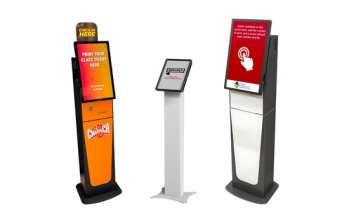
Queue Kiosk Rental
We offers queue management kiosks to transform your event experience. These user-friendly kiosks empower attendees to join virtual queues, receive real-time wait times, and browse event information while they wait. This reduces congestion and frustration, keeping guests informed and organized. For event organizers, queue kiosks improve staff efficiency by automating queue management, and gather valuable data on wait times and attendee behavior for future planning. Nirmaan Technologies’ Queue Kiosks are the perfect solution for conferences, trade shows, amusement parks, or any event with lines, ensuring a smooth-running event in NYC for both attendees and organizers.
-
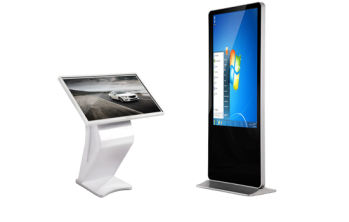
Touch Screen Kiosk Rental
Feature Description Standard Screen Sizes Available in sizes ranging from 43” to 55” Custom Screen Sizes Custom screen sizes are available upon request Integrated Operating Systems Integrated Android or Windows OS, or the option to use your own Media Player or PC Display Quality Full HD commercial-grade display suitable for 24/7 continuous use Custom Landscape Options Custom landscape options are available upon request Custom PCAP Touch Options Custom PCAP (Projected Capacitive) touch options are available upon request Outdoor Rating IP65 outdoor rated options are available upon request -
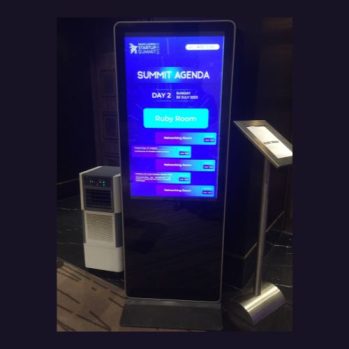
Vertical Ad Player Kiosk Rental
Welcome to Event Management Expert, your premier destination for kiosk vertical ad player rentals. Our kiosks stand at an impressive height of 5ft10inch, boasting a sleek design that commands attention. With a screen height of 43 inches and a width of 25 inches, our vertical ad players deliver crisp and captivating visuals, perfect for showcasing your brand or message at any event.
-
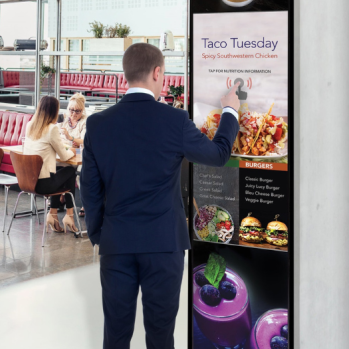
Vertical Ad Player Rental
Grab attention and stand out from the crowd with our captivating curved vertical ad player rentals! These sleek displays boast a unique, immersive design that seamlessly integrates into any environment. Imagine eye-catching product launches with dynamic imagery flowing down the screen, captivating retail displays that draw in customers, or impactful advertisements that leave a lasting impression. Our lightweight, modular panels ensure quick and easy setup, while the vibrant LED technology delivers high-resolution visuals that captivate viewers. Choose from various sizes, pixel pitches, and configurations to perfectly match your space and advertising needs.
-
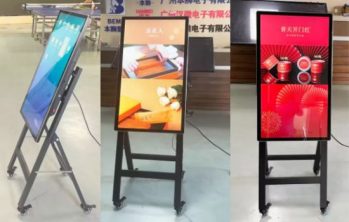
Vertical Ad Player Rental
Feature Description Touch Screen Type Resistive Screen Technology LCD Interface Type USB OS Windows RAM 4GB Brightness 800nits Screen IPS Full HD, Wide Screen Transport Package Wooden Box Specification 55 inch Trademark Zhongheng/OEM/ODM Origin China HS Code 8528591090 -
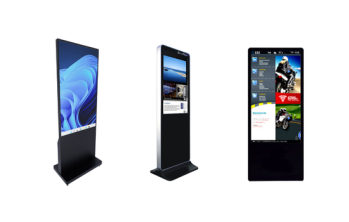
Vertical Interactive Touch Screen KIOSK Rental
Engage your audience with our 50” interactive vertical touch screen kiosk, perfect for events, trade shows, and wayfinding. Featuring full HD display, custom branding, Wi-Fi connectivity, and multi-touch interactivity, it’s a sleek, eco-friendly solution for dynamic content and real-time updates. Plug & play ready—boost engagement instantly!
Interactive KIOSK Display Rental for Events
Make event information, registration, product exploration, and digital content easier to access with our professional KIOSK display rental services. Our freestanding digital and touchscreen KIOSKs are designed for conferences, trade shows, exhibitions, corporate events, brand activations, registration areas, hospitality events, and other temporary event applications.
Choose from touchscreen KIOSKs, horizontal interactive displays, information KIOSKs, queue KIOSKs, vertical digital displays, giant iPad-style displays, and other freestanding digital signage options based on your content, interaction requirements, placement, and event workflow.
Request a KIOSK Display Rental Quote
KIOSK Display Options Available
Our KIOSK rental inventory includes multiple formats for interactive and digital-display applications.
Touch Screen KIOSK Rental
Interactive touchscreen KIOSKs provide a freestanding interface for compatible event applications and digital content.
Key Features
- Interactive touchscreen operation
- Freestanding display format
- Digital menus and navigation
- Product and service presentations
- Interactive event content
- Flexible placement within event spaces
What It Solves: Gives attendees a dedicated interactive display instead of requiring staff to manually present every piece of information.
Best For: Trade shows, conferences, exhibitions, corporate events, product showcases, registration areas, and brand activations.
Information KIOSK Rental
Information KIOSKs create dedicated digital information points throughout an event.
Key Features
- Event information display
- Schedules and agendas
- Speaker information
- Venue maps
- Exhibitor directories
- Sponsor content
- Wayfinding applications
What It Solves: Helps distribute frequently requested information across large or multi-room events.
Best For: Conferences, conventions, trade shows, exhibitions, hospitality events, and large corporate programs.
Horizontal Touch Screen KIOSK Rental
Our 43-inch horizontal touchscreen KIOSK provides a wider interactive surface for applications that benefit from landscape-oriented content.
Key Features
- 43-inch horizontal display format
- Touch interaction
- Landscape-oriented content
- Interactive presentations
- Digital catalogs
- Product exploration
What It Solves: Provides more horizontal screen space for maps, catalogs, product selections, presentations, and compatible interactive interfaces.
Best For: Exhibitions, product demonstrations, interactive maps, corporate events, technology showcases, and sponsor activations.
Giant iPad & Giant iPhone-Style Display Rental
Large-format mobile-device-style displays create a familiar visual format for demonstrating compatible apps, websites, digital products, and branded interactive content.
Key Features
- Oversized device-style presentation
- Interactive digital content
- App and website demonstrations
- Product presentations
- Brand activation applications
- High-visibility freestanding format
What It Solves: Makes mobile-focused products and digital experiences easier for groups of attendees to explore during an event.
Best For: App launches, technology events, exhibitions, experiential marketing, product demonstrations, and brand activations.
Vertical Digital KIOSK & Ad Player Rental
Vertical digital KIOSKs provide a space-efficient format for non-interactive or compatible interactive content.
Key Features
- Portrait-oriented display
- Digital advertising
- Event schedules
- Sponsor graphics
- Promotional content
- Directional messaging
- Product information
What It Solves: Replaces static printed signage with digital content that can be positioned at strategic attendee touchpoints.
Best For: Entrances, registration areas, exhibition aisles, sponsor zones, conference corridors, retail-style activations, and event wayfinding.
Queue KIOSK Rental
Queue KIOSKs can support organized attendee-facing information or compatible queue-management applications when integrated with the appropriate event software and workflow.
Key Features
- Freestanding attendee interface
- Digital instructions
- Queue information
- Registration-area applications
- Directional content
- Compatible interactive workflows
What It Solves: Creates a dedicated digital touchpoint for attendee instructions and queue-related information.
Best For: Registration desks, check-in areas, ticketing environments, conferences, exhibitions, and high-traffic event entrances.
What Can You Use a KIOSK Display For?
KIOSK displays can support a wide range of event applications:
| Event Application | KIOSK Use |
|---|---|
| Event Registration | Check-in instructions and compatible registration interfaces |
| Wayfinding | Venue maps, room locations and directions |
| Conference Information | Agendas, sessions and speaker information |
| Trade Show Directories | Exhibitor listings and booth information |
| Product Demonstrations | Interactive product and service exploration |
| Digital Catalogs | Browse products, services or presentations |
| Brand Activations | Interactive branded experiences |
| Sponsor Displays | Sponsor content and promotional messaging |
| Surveys & Feedback | Compatible attendee feedback applications |
| QR Code Displays | Links to event, product or registration content |
KIOSK Displays for Conferences & Corporate Events
Use KIOSKs throughout conference environments for registration support, schedules, session directories, speaker information, venue maps, sponsor content, surveys, and wayfinding.
Multiple KIOSKs can be positioned at entrances, registration areas, breakout floors, networking spaces, and other high-traffic locations.
KIOSK Displays for Trade Shows & Exhibitions
For trade shows, KIOSKs can become interactive points for product catalogs, exhibitor information, demonstrations, lead-generation interfaces, sponsor content, booth navigation, and digital presentations.
Exhibitors can also use touchscreen displays to let visitors explore products without relying entirely on printed brochures.
KIOSK Displays for Product & Technology Demonstrations
Interactive KIOSKs are particularly useful when the product itself is digital.
Compatible content may include:
- Websites
- Mobile applications
- Software platforms
- Product catalogs
- Interactive presentations
- Maps
- Digital portfolios
- Demonstration interfaces
- Surveys
- Branded experiences
The exact functionality depends on the KIOSK model, software, content source, peripherals, internet requirements, and application being used.
KIOSK Displays for Registration & Check-In
KIOSKs can provide the attendee-facing display for compatible registration and check-in workflows.
Depending on the event, additional systems may be required for:
- Registration software
- Badge printing
- QR or barcode scanning
- Payment processing
- Attendee databases
- Authentication
- Internet connectivity
- Printers or scanners
- Access control
A display rental should not automatically be assumed to include registration software, payment processing, attendee databases, or other third-party platforms.
How We Plan Your KIOSK Display Rental
We match the KIOSK setup to your actual event requirements rather than treating every application the same.
We consider:
- Touch vs. non-touch requirements
- Portrait vs. landscape content
- Screen size
- Number of KIOSKs
- KIOSK placement
- Content format
- Software requirements
- Internet requirements
- Peripheral requirements
- Attendee traffic flow
- Power availability
- Event duration
- Installation schedule
For multi-KIOSK events, placement can also be planned around entrances, registration areas, breakout rooms, exhibit floors, sponsor zones, and attendee circulation.
KIOSK Display Rental for Different Event Types
Our KIOSK displays can support:
- Conferences
- Trade Shows
- Exhibitions
- Conventions
- Corporate Events
- Product Launches
- Technology Events
- University Events
- Hospitality Events
- Brand Activations
- Registration Areas
- Sponsor Activations
- Networking Events
- Interactive Product Showcases
Why Rent KIOSK Displays From Us?
A professional KIOSK rental gives your event access to the required display format without purchasing equipment for temporary use.
Our event-focused approach can include:
- Multiple KIOSK formats
- Touchscreen display options
- Digital signage options
- Interactive display planning
- Multi-KIOSK event configurations
- Content-source planning
- Placement planning
- Delivery
- Professional setup
- System testing
- Technical support based on event scope
- Post-event removal
Frequently Asked Questions About KIOSK Display Rental
Are all rental KIOSKs touchscreen?
No. The available inventory includes both interactive touchscreen applications and digital-display formats. The right model depends on what attendees need to do with the screen.
Can KIOSKs be used for event registration?
Yes, KIOSKs can provide the attendee-facing display for compatible registration workflows. Registration software, databases, scanners, printers, credentials, and other integrations need to be confirmed separately.
Can we use KIOSKs for trade show booths?
Yes. They are useful for product demonstrations, digital catalogs, lead-generation interfaces, presentations, sponsor content, and interactive experiences.
Can KIOSKs display our website?
Potentially, yes. Compatibility depends on the selected KIOSK, website, operating environment, connectivity, and required interactions.
Can we demonstrate an app on a KIOSK?
Yes, when the application and selected display configuration are compatible. App demonstrations should be tested before the event.
Can KIOSKs show event schedules and maps?
Yes. Digital schedules, agendas, maps, directories, room information, and wayfinding are common KIOSK applications.
Can we rent multiple KIOSKs for one event?
Yes. Multiple units can be planned for registration, entrances, breakout floors, exhibit areas, sponsor zones, and other attendee touchpoints.
Do KIOSK rentals include Wi-Fi?
Internet connectivity should be confirmed separately. Venue Wi-Fi should not automatically be assumed suitable for mission-critical interactive applications.
Can KIOSKs collect attendee information?
The display can potentially work with compatible data-collection software. Any collection of personal information requires the organizer’s appropriate software, permissions, privacy procedures, security controls, and data-management workflow.
Do you provide setup?
Professional setup can be included based on the rental scope, equipment configuration, venue access, and event requirements.
Can KIOSKs be used outdoors?
Only when the specific selected equipment and event environment are appropriate for outdoor use. Do not assume every KIOSK is weather-rated.
How do I choose the right KIOSK?
Tell us your event type, application, number of units, content, touch requirements, software needs, venue, and event dates. We can then determine the appropriate display configuration.